
How to Get Started with Buildium
Reading Time: 12 minutes Proper documentation of billings and leases is important to every landlord. We provide that in real-time using Buildium, a property management software that makes our operations easier. So in today’s video, we are showing you Buildium: what it looks like and how to get started with it. What is Buildium Buildium is a…
Proper documentation of billings and leases is important to every landlord. We provide that in real-time using Buildium, a property management software that makes our operations easier. So in today’s video, we are showing you Buildium: what it looks like and how to get started with it.
What is Buildium
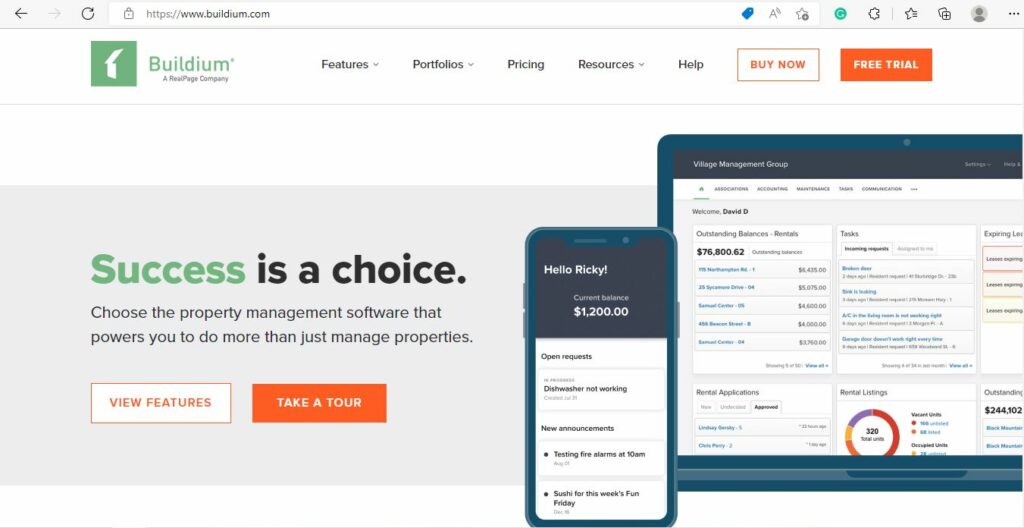
Buildium is a software that covers the four main aspects of property management: Accounting, Business Operations, Leasing, and Community Association Management.
Tenant Screening Options
When it comes to finding the right tenants for your property, thorough screening is key. Most property management software platforms offer integrated screening tools to streamline this process. Typically, you’ll find two levels of tenant screening:
- Basic Screening: This includes essentials like credit checks, eviction history, and background reports. These features help you quickly identify any red flags—think unpaid debts or prior evictions—without digging through stacks of paperwork. Many platforms partner with well-known third-party services such as TransUnion or Experian to provide this data securely.
- Premium Screening: If you want a more comprehensive overview, premium options usually go further. In addition to everything in the basic package, you might see detailed income verification, previous landlord references, and even national criminal searches. This is particularly useful if you want a deeper layer of due diligence before making leasing decisions.
Both options aim to give you peace of mind and help you select reliable tenants. You simply choose the screening package that fits your comfort level, initiate the process within the software, and results are returned in real time—saving you hours and reducing the guesswork.
From Lead to Lease: The Process Simplified
Managing rentals isn’t just about collecting rent—it begins long before a tenant ever moves in. The “lead to lease” journey in property management software streamlines everything from that very first inquiry to a signed lease, making life easier for landlords and property managers alike.
Here’s how it typically works:
- Attracting Tenants: Start by creating attractive listings and posting them on public platforms like Zillow, Apartments.com, and Facebook Marketplace. This ensures maximum visibility for your rental property.
- Streamlined Applications: Prospective tenants can easily apply through an online application, allowing you to gather all necessary information with just a few clicks.
- Efficient Screening: Background and credit checks can be seamlessly initiated, helping you vet applicants for reliability and fit—think TransUnion or Experian for trusted screening.
- Coordinating Showings: Schedule and manage property showings, whether in-person, through virtual tours, or via self-showing lockboxes like Rently or CodeBox.
- Digital Leasing: Once you’ve found the right tenant, send and sign leases electronically. This speeds things up (no more printing or waiting for mail!) and keeps everyone on the same page.
By using property management software for each of these steps, you ensure that nothing slips through the cracks, making the transition from interested lead to signed lease as smooth as possible.
How Buildium Works
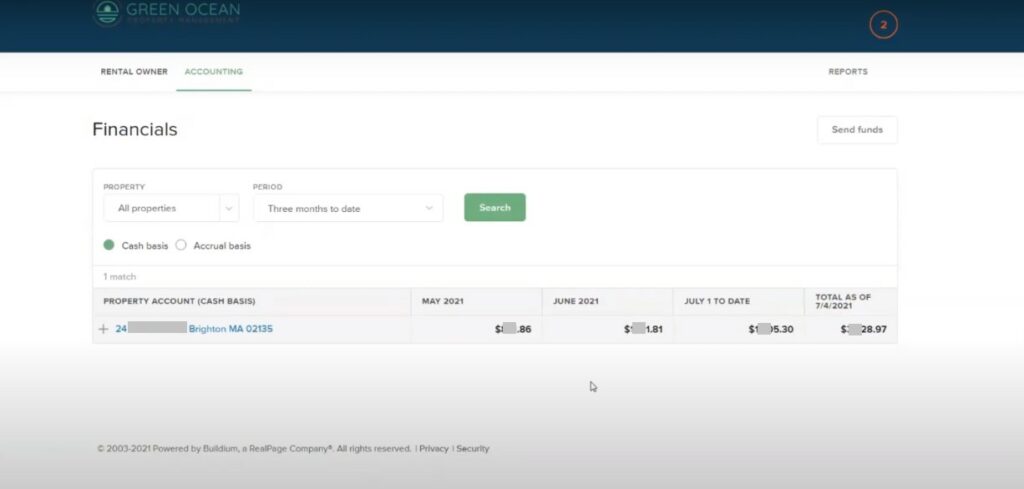
A screenshot of Green Ocean Property Management’s Buildium account
We are showing you an actual account for one of the properties we manage so that you know what the interface looks like. Once you log in, you can see the Rental Owner Section. From there, you can go to your Financials.
You can also view the Rental Owner Ledger, where you can see all the funds that get transferred to you on any given basis each month.
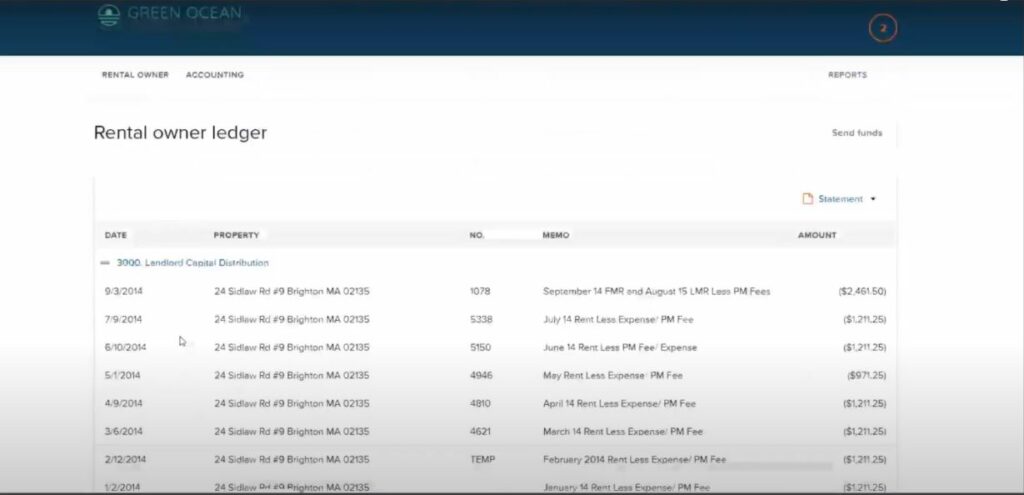
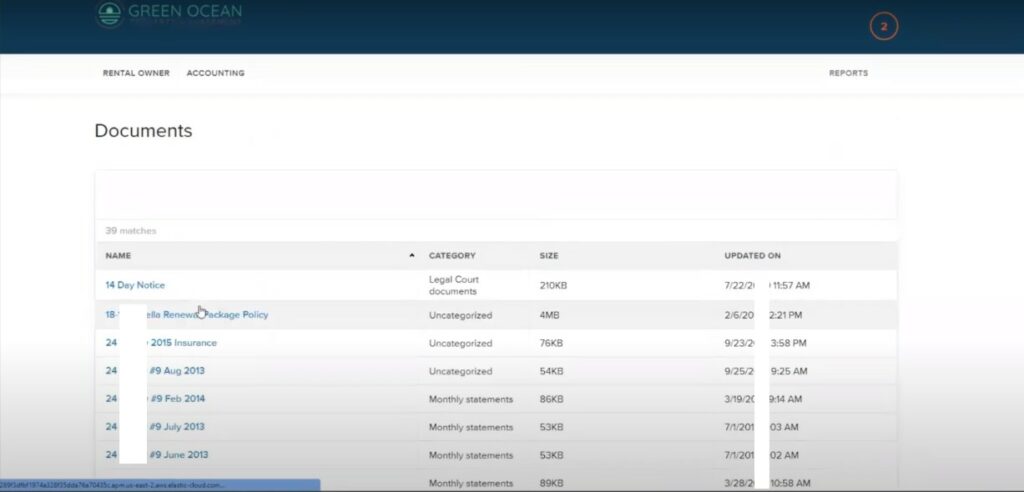
In addition, you can see any type of document related to your policy under the Documents tab such as statements or leases.
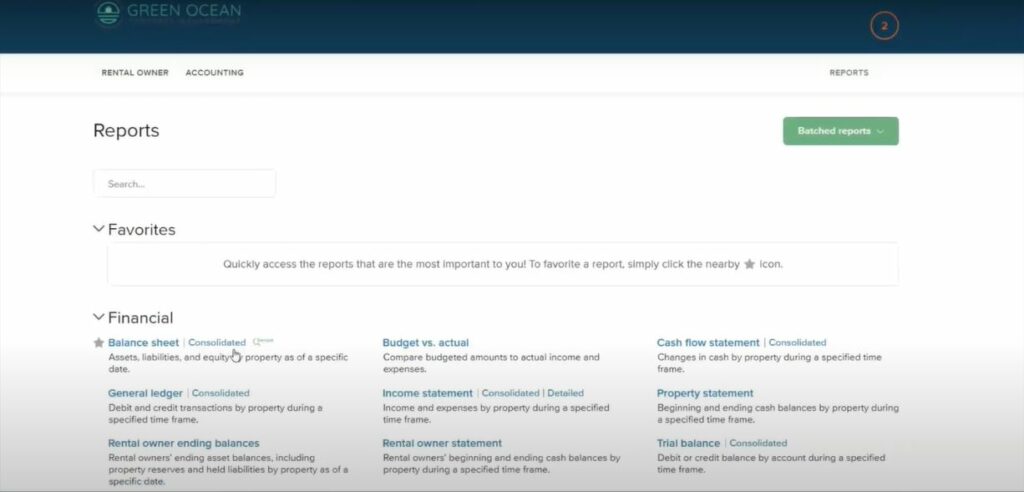
There is also a Reports tab. You can view reports on budget versus actuals, income versus expenses, or balance sheets.
Entering Your Property Details
Now that you have an overview of the main Buildium dashboard, let’s walk through how you can enter essential data for your rentals. This process ensures your account is organized from the start, making future management seamless.
Getting Started:
- Add Properties:
Start by entering each property you manage. You’ll input basic details like the address, unit information, and any distinguishing features—think about including things like parking spaces or amenities unique to each unit. - Input Tenant Information:
Next, add your residents’ details. Enter in tenant names, contact info, and move-in dates. Keeping these records current will save headaches down the line when lease renewals and communications come up. - Record Lease Information:
For every unit, attach an active lease. This includes start and end dates, rent amounts, and any deposit details. Upload the actual lease documents under the Documents tab for easy retrieval later. - Add Vendors:
Create profiles for your trusted contractors, such as plumbers, electricians, or landscaping companies. Having vendor information on hand helps you quickly assign tasks and track payments or work orders. - List Rental Owners:
If you manage properties for different owners, input their details too. This will keep financial reporting organized and make sure everyone has access to their own property’s information.
By taking the time to input thorough and accurate data for properties, tenants, leases, vendors, and owners, you’re setting up your account for painless property management.
Maintenance and Communication Made Simple
Staying on top of property maintenance and keeping everyone in the loop is vital for smooth operations. In our system, you can easily create maintenance requests, assign tasks, and generate work orders right from your dashboard. Whether it’s a leaky faucet or a major repair, tracking these tasks is a breeze—you’ll always know what’s in progress and what’s been completed.
Communication is just as seamless. Need to update tenants on a scheduled repair? Want to keep owners informed about maintenance costs? With a few clicks, you can message tenants, rental owners, association members, vendors, and even your staff. No more juggling emails or sifting through paperwork—every conversation is organized and easily accessible in one place.
This centralized approach ensures you handle requests promptly, keep everyone on the same page, and build trust with owners and residents alike.
Entering Opening Balances
Whether you’re managing a single-family home, a multi-unit rental, or an association property, getting started means bringing your books up to speed right from day one. Entering opening balances ensures all your financial records are accurate and up-to-date, setting the stage for transparent management.
For rental properties, you’ll want to:
- Input your starting bank balance—this is the amount currently in the bank account you’ll use for property transactions.
- Enter each tenant’s beginning balance, which might include prepaid rent, security deposits, or outstanding charges.
For associations, the steps are similar:
- Start by adding your association’s current bank balance.
- Record each owner’s starting balance, such as prepaid dues or any pending charges.
This process gives you a clear snapshot of your finances, so you can track income, expenses, and owner or tenant activity from your very first login.
Setting Up Account and User Settings
Let’s walk through how you can manage your account and user settings to tailor the platform for your team.
When you first set up your account, you’ll have access to a dashboard where you can configure your company details, contact information, and notification preferences. This is where you set the ground rules for how your property management operations communicate updates and reminders to you and your users.
For managers working with a team—whether it’s a leasing agent, bookkeeper, or maintenance coordinator—you can assign roles and permissions for each team member. This ensures everyone accesses only the information they need, helping you keep sensitive data secure while making collaboration seamless. For example, your accountant might have full access to the financial section, while your leasing agent is only able to view lease documents and tenant information.
To update user permissions, simply navigate to the user management settings. Here, you can:
- Invite new users by entering their email addresses and choosing their access level
- Revoke access for team members who no longer require it
- Adjust permissions as roles change, making it easy to grow your team or scale back as needed
Security is a top priority, so you can also enable two-factor authentication and manage password requirements from this section.
Once your user settings are in place, you’ll have confidence that everyone on your team can work efficiently—and that your information is protected.
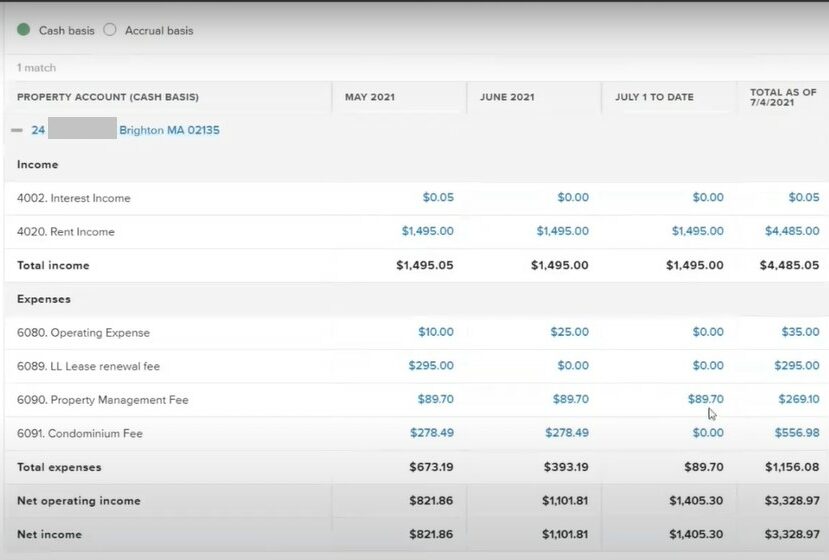
Below is a sample property account, showing your Interest Income, Rent Income, and Expenses at a glance. You can even click on the amount to get a copy of the receipt details.
Streamlining Payments with Electronic Payment Features
With modern property management tools, streamlining how you handle payments is easier than ever. By enabling electronic payment features, you can offer tenants and owners convenient ways to send and receive money—without waiting for a paper check to arrive in the mail.
To get started, simply navigate to your account’s payment settings. From there, you can enable electronic payments for rent collections, reimbursements, and vendor bills. After setting up your chosen payment method—such as ACH transfers (similar to what PayPal and Zelle offer) or credit card options—your residents and owners can pay securely online. Funds are deposited directly into your designated bank account, reducing delays and minimizing manual entry.
Some benefits of going electronic include:
- Automatically tracking all transactions in one place for easy reconciliation.
- Reducing paperwork and eliminating errors from manual recording.
- Providing residents, owners, and vendors with email notifications when payments are processed or received.
Setting up electronic payments not only saves time but also gives everyone—the property manager, landlords, and residents alike—greater transparency and peace of mind.
Using Electronic Leasing Features
Leasing agents can take advantage of electronic leasing features to streamline the entire lease creation and signing process. Here’s how it works:
- Draft new leases digitally: Start by creating the lease agreement right within the software—no need for printing or scanning.
- Customize templates: Easily tailor standard lease templates to fit each property or situation, saving time and ensuring every important detail is included.
- Send leases for e-signature: Once your lease is ready, simply send it out to tenants and any necessary staff members via email. Tenants can access the document on their own devices and review every section at their own pace.
- Collect electronic signatures: Tenants and staff can sign electronically, eliminating the hassle of chasing down paperwork or coordinating meetings. Most platforms, like DocuSign or HelloSign, provide legal, secure methods for collecting digital signatures.
- Automatic storage and tracking: Signed leases are automatically stored within your management dashboard, making them easy to access, track, and reference later.
By using electronic leasing, you speed up the leasing process, minimize errors, and provide a more convenient experience for your tenants—no more lost paperwork or back-and-forth scheduling. This helps property managers and owners stay organized, efficient, and up to date with all lease agreements at their fingertips.
Handling 1099-MISC E-Filing for Rental Owners and Vendors
Another helpful feature available to landlords and property managers is the streamlined process for 1099-MISC e-filing. At the end of the year, every landlord must provide 1099-MISC forms to rental owners and vendors who received payments above the IRS threshold. This can be a tedious process if done manually, but property management software takes most of the headaches away. Here’s how it works:
- Automated Calculations: The software tracks payments throughout the year, automatically calculating amounts paid to vendors and owners—so you’re not scrambling to add up invoices come January.
- Easy E-Filing: At tax time, you simply review the automatically generated totals, make any necessary adjustments, and e-file the forms directly from your account. The system takes care of filing with the IRS and sending recipient copies.
- Document Organization: All past 1099s, receipts, and supporting documents are securely stored within your account for quick reference and audit protection.
With these tools, landlords and property managers can save time, reduce errors, and confidently meet their year-end tax obligations.
Managing Move-Ins and Move-Outs
Handling the turnover of rentals is one of the most important (and sometimes stressful) aspects of property management. Here’s how we use our system to make the entire move-in and move-out process smooth and well-documented:
For Move-Ins:
- We track all incoming security deposits, prepaid rent, and any owner-held deposits so there’s never confusion about where funds are coming from or where they’re stored.
- New tenants’ leases and supporting documents are uploaded directly to your property’s account, making them available for you to review at any time.
- We provide a clear, itemized record of every payment—whether it’s the first month’s rent, pet deposit, or additional fees—so you always have a full audit trail.
For Move-Outs:
- When a tenant is ready to move out, we document the process right from the notice to vacate all the way through the final inspection.
- We record deductions (if any) from the security deposit for damages or unpaid rent, along with supporting receipts or estimates.
- Once move-out is complete, you’ll have access to a statement showing the final accounting, including return of the security deposit (minus any deductions) to the tenant.
All these steps are recorded in real time within your owner portal, so you can monitor each phase—from move-in to move-out—without sending a single email or making a phone call.
Conducting Property Inspections On The Go
Want to streamline your property inspections without being tied to a desk? With integrations like Happy Inspector, it’s easy for property managers to perform detailed inspections directly from a mobile device. This means you or your staff can walk through units, take photos, jot down notes, and complete checklists—all while on site.
Here’s how it works:
- Access inspection forms instantly from your phone or tablet.
- Capture photos and comments in real-time to document the property’s condition.
- Sync your reports automatically with your management dashboard, so nothing gets lost in the shuffle.
- Share completed inspection reports with property owners or tenants with just a few clicks.
This level of flexibility lets you keep accurate records and quickly address maintenance needs, providing an extra layer of transparency for both property managers and owners.
Managing Your Accounting Cycle
For rental property owners and association managers alike, Buildium supports a smooth monthly accounting cycle. Whether you’re receiving rent payments from tenants, collecting association dues, or reconciling your bank accounts, every transaction is clearly documented and easy to track.
- For Rental Properties: You can follow the entire financial process—from payment collection to monthly reconciliation—directly within the platform, ensuring you always know where your money is at every step.
- For Associations: If you manage a condo or homeowners association, you’ll find tools tailored for association accounting, allowing you to oversee dues, expenses, and financial reports for every member or unit.
All of these features mean that, at the end of each month, reconciling your statements is straightforward. You’ll know exactly what your net amount is, and you can easily match it to the deposits hitting your bank.
Overall, you will know what your net amount is every month. With Buildium, you can match the net amount with the deposits you get in your bank. Get started with Buildium today to achieve full transparency on all aspects of managing your properties.
Handling Maintenance and Communication with Property Management Software
Maintenance issues and clear communication with tenants and owners are at the heart of smooth property management. With comprehensive property management software, handling these tasks becomes much more straightforward and efficient.
Here’s how you can use the tools provided:
- Centralized Task Management: Create, assign, and track maintenance requests as soon as they come in—whether it’s fixing a leaky faucet or scheduling common area inspections. This keeps your to-do list organized and ensures nothing falls through the cracks.
- Work Order Coordination: Generate work orders with just a few clicks. Attach photos or notes so your vendors or maintenance staff know exactly what needs attention. You can monitor progress every step of the way, from request to completion.
- Automated Updates: The platform keeps tenants, owners, and vendors in the loop automatically. Tenants are notified when their issue has been received, owners are updated about work progress, and vendors know exactly where and when they’re needed—all without dozens of back-and-forth phone calls.
- Secure Document Sharing: Share important documents—like inspection reports or receipts—right through the software, ensuring easy access for everyone who needs them.
- Efficient Messaging: Built-in messaging or email tools let you communicate directly with tenants, rental owners, or your team, making sure everyone stays informed in real time.
These features are designed to streamline maintenance and communication, giving you more time to focus on growing your business and less time chasing updates or paperwork.
Customizing Your Public Website and Rental Applications
One of the benefits of using modern property management software is how much you can personalize your online presence—no coding required. You have the ability to tailor your public-facing website to reflect your brand, your unique value offering, and even neighborhood-specific photos or details that set your properties apart. This means you can easily update your logo, contact information, color schemes, and even highlight preferred amenities or pet policies.
When it comes to the rental application process, customization goes a long way. You can adjust the fields and questions in your application to suit your screening preferences. For example, add requirements for employment history, references, or specific documentation uploads. This flexibility cuts down on back-and-forth communication, and helps gather all necessary details upfront—whether you’re listing on Zillow, Apartments.com, or your own site.
So, whether you want to highlight energy-efficient upgrades in the property description or ask targeted questions about a prospective renter’s background, today’s software puts you in control, all while streamlining the leasing process for both owners and applicants.
How a Showings Coordinator Automates Your Leasing Process
Let’s talk about making your rental property showings run like clockwork. Tools like Tenant Turner serve as your digital assistant, streamlining the journey from lead to lease.
Here’s how it works:
- Automated Lead Follow-up: As soon as someone is interested in your property, the system follows up instantly. No more sifting through emails or playing phone tag—interested renters get an immediate response with next steps.
- Online Scheduling: Prospective tenants can schedule showings based on your availability. The tool syncs with your calendar, so appointments are set without the back-and-forth.
- Efficient Screening: Some platforms even pre-qualify renters with basic screening questions, ensuring only the best-fit prospects take that next step.
- Reminders and Confirmations: Automatic reminders go out to both you and the prospective renter, reducing no-shows and saving everyone time.
With automation handling your follow-ups and scheduling, you spend less time coordinating and more time focusing on your properties. If you’re looking for an easier way to handle showings, this is a game-changer.
Our commitment
So if you or anyone else you know is looking for a property management company that can provide you full transparency – online and real-time – please think of Green Ocean Property Management: where you get more than a property manager, you get peace of mind.
Heat and AC Zones Guide: Why Having Multiple Zones Benefit the Tenants
Reading Time: 2 minutesIn a rental property with multiple rooms, a zoned home is a must as different family members have different comfort levels. Here’s Green Ocean’s Heat and AC Zone Guide to familiarize yourself with the benefits of having multiple zones. What is a zone? A zone is a different section of the actual building that…

Insulation Inspection with Green Ocean Property Management
Reading Time: 3 minutesWelcome to Green Ocean Property Management’s blog, where we take you through a crucial aspect of the renovation process: the insulation inspection. In Massachusetts, only a few towns and cities perform this specific inspection, which ensures your home is properly insulated. We’ll delve into the significance of this inspection, its timing, and why Green Ocean…

How to Reglaze Backsplash Tiles and Tubs to SAVE Money
Reading Time: 2 minutes People are taking showers, washing their dirty bodies every day, resulting in tubs and tiles stains. It gets discolored, grimy, and dirty. This isn’t very interesting to most prospective renters or anybody who is living in the unit, so probably every 4 or 5 years, depending upon the usage, we’re going to go in…
Experience exceptional management and elevate your property with us