HomeWiseDocs, Explained
Reading Time: 9 minutes Gone are the days when paperwork for sale or refinance of properties is done manually and takes a while to process. Today’s article shows you how HomeWiseDocs simplifies complex and time-consuming tasks for property managers to serve you quickly and efficiently. What Is HomeWiseDocs HomeWiseDocs is a third-party company with a website…
Gone are the days when paperwork for sale or refinance of properties is done manually and takes a while to process. Today’s article shows you how HomeWiseDocs simplifies complex and time-consuming tasks for property managers to serve you quickly and efficiently.
What Is HomeWiseDocs
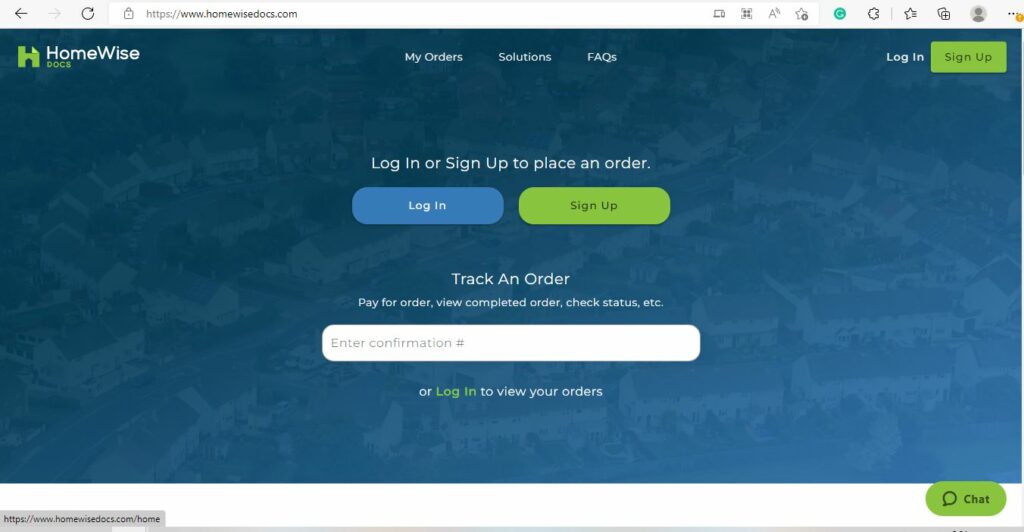
HomeWiseDocs is a third-party company with a website that allows us to quickly serve our condo association owners when they need the information required or requested for sale, a refinance, or a purchase.
What exactly does HomeWiseDocs do? In a nutshell, HomeWiseDocs provides centralized document management services for community associations and management companies. Through their platform, you can easily access documents related to disclosures, lender questionnaires, and other essential real estate paperwork—all the things banks, buyers, or sellers might start clamoring for whenever a condo changes hands.
Who Can Use HomeWiseDocs?
HomeWiseDocs is available to anyone involved in a real estate transaction where documents need to change hands—that means buyers, sellers, real estate agents, lenders, and even attorneys. Whether you’re handling the resale of a unit, refinancing, or just gathering info for your due diligence, you can request the necessary documents right through their portal. This convenience isn’t limited by location; as long as the community or management company uses HomeWiseDocs, you’re good to go.
More broadly, HomeWiseDocs belongs to a category of document generation and management software solutions. These types of companies specialize in helping real estate professionals—and homeowners—create, coordinate, sign, deliver, and store essential documents throughout a transaction. Other well-known options in this space include DocuSign, EzLandlordForms, Glide, MyNHD, SnapNHD, and ZipLogix. Each of these services is designed to streamline the mountains of paperwork involved in real estate, making the process faster, more secure, and less stressful for everyone involved.
Anytime you sell or buy a property like a condo, you are going to need something called Net 60. It is a form that states there is no money owed on your condo ledger. In addition, the bank might require a condo questionnaire. It is the list of questions that the banks will ask to ensure that the property that someone else is buying or selling will conform to their bank requirements for the funding of a loan. They might also be requesting condo documents or anything else related to the building.
Centralized Document Management
This is where HomeWiseDocs comes in handy. HomeWiseDocs provides centralized document management services for community associations and management companies. Through their platform, you can access all the essential documents needed for real estate transactions—whether it’s disclosures, lender questionnaires, or other important paperwork related to the sale, purchase, or refinance of a unit. Everything you need is organized and available in one convenient place, cutting down on the back-and-forth and eliminating stacks of manual forms.
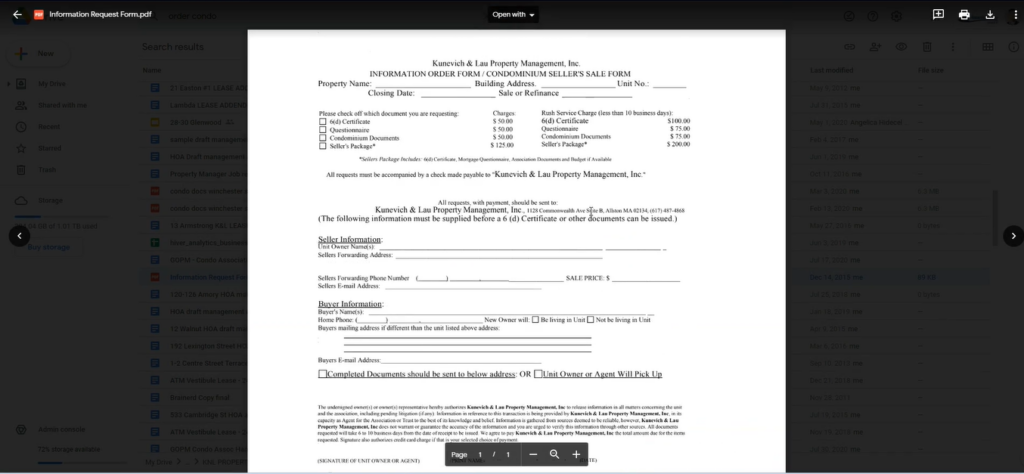
A screenshot of the sample Information Request Form we used to have to fill out manually before we switched to HomeWiseDocs
In the past, the condo owner would have to fill out this paper form we used a long time ago. They would have to click off what they needed, send in a cheque, write everything in, scan it, and email it to us. We would have to process it, get the actual cheque, and get it via snail mail. All of which would take forever.
Instead, we pre-loaded the majority of the information into this software called HomeWiseDocs. The unit owner needs to log in, purchase what they want, sign up for it, and pay online. Then on our end, we are notified.
Welcome to a New Way to Request Resale Docs and Questionnaires
Gone are the days of shuffling paper forms and waiting for checks to clear. Now, when you need essential documents—like resale certificates, estoppel letters, or lender questionnaires—it all starts with a simple online portal. Owners, buyers, and lenders can access everything they need through a centralized dashboard, request specific documents, and pay for them securely in just a few clicks. It’s a streamlined, user-friendly process designed to save everyone time and hassle.
Unlocking Revenue Opportunities for Property Managers and Associations
One of the major perks for property managers and associations using HomeWiseDocs is how it can help boost revenue with minimal extra effort. Traditionally, processing document requests involved a lot of manual work—chasing payments, printing paperwork, mailing forms back and forth—which rarely translated into meaningful income. Now, by centralizing and automating document delivery, property managers can set clear fees for each type of request and ensure payments are collected instantly through the online platform.
Many communities discover that, by streamlining the workflow and making it easier for owners, buyers, and lenders to access necessary forms, the number of completed requests goes up. This not only covers administrative costs but often creates a new, reliable income stream. Instead of time-consuming paperwork eating into your day (and your bottom line), you’re building efficiency and opening the door to increased revenue—all while offering better service to residents and stakeholders.
Typical Pricing for Document Storage and Delivery
Most third-party platforms like HomeWiseDocs use a pay-per-document pricing model for storage and delivery of real estate paperwork. Instead of charging a monthly subscription, these services typically collect a separate fee each time a document is requested or delivered.
Here’s how it usually works:
- One-time Fee per Document: When you request items such as resale certificates, estoppel letters, or lender questionnaires, there will be a charge for each document type. This fee often ranges from $25 to $400, depending on the complexity and location.
- Online Payment: Vendors like CondoCerts and HomeWiseDocs accept credit card payments directly through their websites, so owners, buyers, and lenders can pay instantly for faster processing.
- Expedited Service Option: Some services also offer “rush” or expedited processing for an additional fee if you’re in a hurry.
Pricing details are usually displayed during the online order process, so you’ll know exactly what to expect before making any purchases. This streamlined billing approach removes guesswork and helps owners predict costs more easily.
How HomeWiseDocs Works
How Integrations Handle Data Sync and Access
If you’re wondering how platforms like HomeWiseDocs “talk” to your property management software, it’s actually designed to be pretty seamless. These integrations act like a digital bridge, securely connecting your association’s records to the HomeWiseDocs portal so everyone’s working with the same up-to-date information—no duplicate files, no manual double entry.
Typically, here’s how the process works:
- Data Sharing: Information about properties, owners, and your community is automatically transferred between your management platform and HomeWiseDocs. When you upload something in one place, it stays consistent everywhere.
- Real-Time Updates: Any updates—like a change in ownership or a paid invoice—are synchronized between systems. This means you don’t have to repeat tasks in multiple apps or send forms back and forth.
- Secure Permissions: Access to sensitive data is carefully managed. Only those who need it, like owners, buyers, or authorized vendors, can view or edit certain information.
- Less Busywork: The goal is to cut back on repetitive paperwork and emails. Once set up, most data flows behind the scenes, so you can focus on the transaction itself instead of tracking down forms.
This type of integration is becoming the norm with third-party platforms such as CondoCerts or HomeWiseDocs. By linking to your existing systems, these services take a lot of the manual effort—and potential for errors—out of document requests and approvals.
How to Integrate HomeWiseDocs with Your Property Management Platform
Curious about how to connect HomeWiseDocs to your property management system? The process is surprisingly straightforward—and you don’t have to be a tech wizard to get things moving. Here’s a simple walkthrough for setting up the integration:
- Administrator Required: First, it’s important that someone with administrative access handles the initial setup—this ensures all permissions are squared away.
- Access the Integrations Menu: Look for your property management software’s integrations or marketplace area. This section typically houses all approved third-party partners, including HomeWiseDocs.
- Find HomeWiseDocs: You can either use the search feature, browse by category (often under “Associations” or similar), or scroll through the alphabetical list to locate HomeWiseDocs.
- Initiate the Connection: Once you’ve found HomeWiseDocs in the directory, click to begin the setup. You’ll generally be taken to HomeWiseDocs’ website to provide your contact details. From there, the HomeWiseDocs team will reach out and walk you through the onboarding steps.
- Grant Permissions: During this process, you’ll be prompted to review and approve the necessary permissions to let your property management platform and HomeWiseDocs share information securely.
- Finalize the Setup: After confirming access, you’ll log into your HomeWiseDocs account to wrap up the integration.
Once everything is connected, requesting and processing documents through HomeWiseDocs becomes a breeze right from your usual dashboard—no juggling logins or hopping between different programs.
Already Have a HomeWiseDocs Account?
If you’ve used HomeWiseDocs before, you can simply log in to your existing account and proceed as usual. This will take you straight to the HomeWiseDocs dashboard, where you can place new orders, check your document status, and manage any paperwork without having to create a new profile or re-enter information.
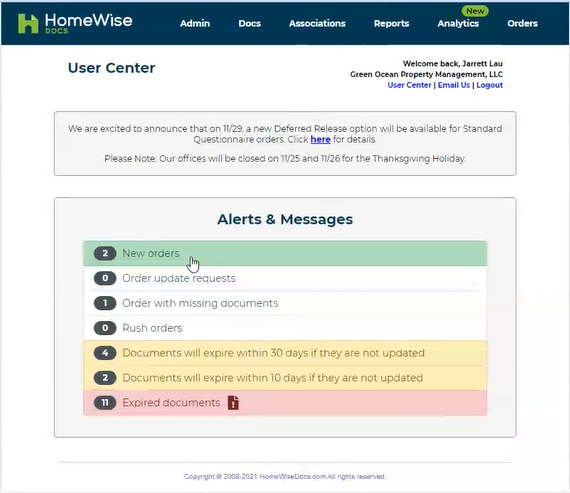
A screenshot of GOPM’s HomeWiseDocs User Center, where we can view all notifications
Here, we can see all orders, when they are due, and can click on them to start processing that paperwork. We go through all the information. Instead of having to fill out every single form individually, we already pre-filled the majority of required fields.
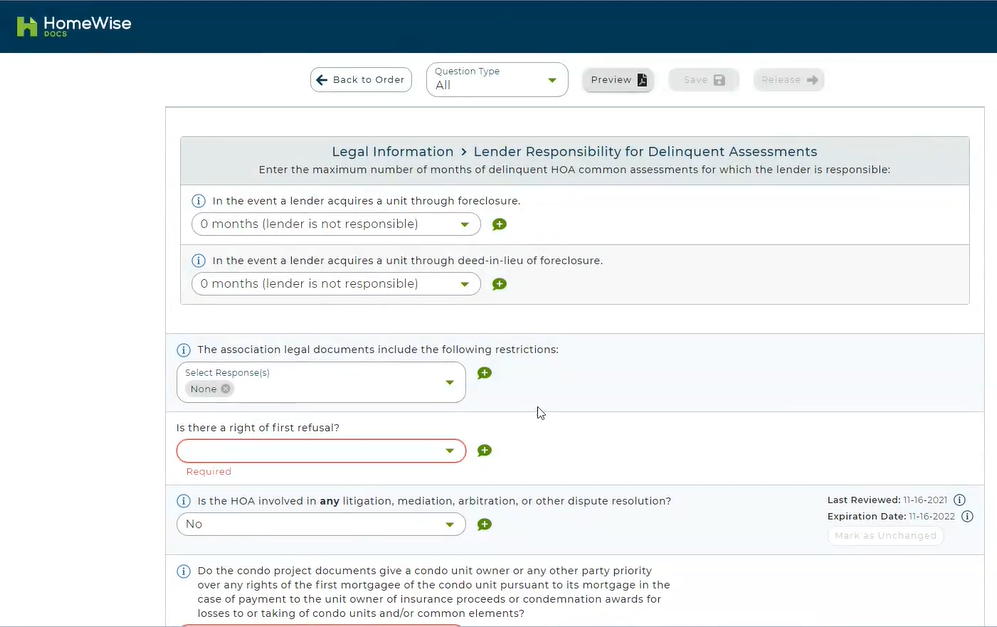
Some sample fields we pre-loaded to save processing time
With this, we can do the processing more quickly and efficiently for the owners. They will get the documents back faster. Consequently, they can submit them to the banks that need them to process the loan for the property.
Once we fill out all this information, we hit the Submit button, and the owners receive it electronically. The entire process can happen within minutes rather than the old-school way of requesting it via paper with the cheque and mailing it out. In fact, with the level of automation provided by platforms like HomeWiseDocs and CondoCerts, processing resale documents can take less than a minute—no exaggeration. This means owners and agents aren’t left waiting for days or shuffling paperwork, but instead enjoy a streamlined, efficient workflow that gets essential documents where they need to go, fast.
Connecting Your HomeWiseDocs Account to Your Property Management Portal
If you’re already using HomeWiseDocs and need to link your existing account to your property management platform, the process is pretty straightforward. Here’s how you can make that connection seamless:
- Sign In: Start by logging into your property management portal as you normally would.
- Initiate Integration: Look for an option to add or connect external document services—HomeWiseDocs will usually be listed among the choices.
- Review Permissions: You’ll be prompted to grant permissions for the integration. Be sure to review these to understand what access the platform will have.
- Accept and Authorize: Agree to any terms of use and authorize the connection.
- Complete Login: Finally, log into your HomeWiseDocs account when prompted to finalize the link.
Once connected, you’ll be able to manage your documents directly within the property management system, making the whole experience even more efficient for both owners and administrators.
What Permissions Are Required to Connect HomeWiseDocs?
When you’re linking HomeWiseDocs to your property management platform, you’ll be prompted to review and grant certain permissions during the setup process. Typically, these permissions allow HomeWiseDocs to:
- Access relevant property data, such as unit addresses and owner contact information, for document preparation.
- Retrieve and update transaction status—so you and your team can track requests in real time.
- Sync specific files and forms, enabling seamless delivery and storage of any completed paperwork.
Before you complete the connection, you’ll be shown a summary of these permissions. Carefully review exactly what access is being requested (it’s usually limited to what’s necessary for document fulfillment), then confirm your agreement and finalize the link by accepting the terms of use and allowing access. This step ensures the two platforms can share information securely and efficiently for a hassle-free experience.
Getting Help or Asking Questions
If you need assistance or have questions about your documents, reaching out to the right person is straightforward. Most platforms, HomeWiseDocs included, provide clear contact options within your user dashboard. Typically, you’ll find:
- Direct Messaging: A built-in messaging system lets you contact your property manager or management company right from the document portal.
- Contact Information: Many sites list direct phone numbers or email addresses for the management team handling your request.
- Support Portals: Some services, like DocuSign and CondoCerts, have robust help centers where you can submit a support ticket and track your inquiry.
No matter what platform you’re using, look for a “Help” or “Contact Us” link—generally located in the footer or main menu—so you can get your questions answered quickly and efficiently.
Alternatives and Competitors to HomeWiseDocs
If you’re curious about other options out there, there are several platforms designed to help real estate professionals manage documents efficiently. These tools streamline tasks like document creation, e-signatures, delivery, and secure storage—much like HomeWiseDocs does for us.
Some common names you might come across include:
- DocuSign: Widely used for fast and secure digital signatures, especially during property transactions.
- EzLandlordForms: Offers templates and document automation tailored for landlords and property managers.
- Glide: Focuses on simplifying real estate forms and workflow for agents and brokers.
- MyNHD and SnapNHD: Services dedicated to providing natural hazard disclosure reports and required documents.
- ZipLogix: Known for its comprehensive suite of tools to draft, manage, and store real estate forms.
All these platforms share one goal: reducing paperwork headaches and accelerating transaction timelines for buyers, sellers, and managers alike. While their specific features or interfaces may differ, the ultimate goal is always to make life easier for both property professionals and owners.
Our commitment
So, if you or anyone else you know is looking for a proactive property manager to integrate different technologies to serve better you, your condo association owners, and the building in general, please think of Green Ocean Property Management: where you get more than a property manager, you get peace of mind!

How to Market Your Investment Property to a Specific Tenant Demographics
Reading Time: 4 minutesThe key to successful real estate investing lies in effectively marketing your property to specific tenant demographics. By employing strategic marketing strategies, you can increase the visibility of your rental units and attract tenants who align with your property’s unique features. In this article, we will explore valuable tips and techniques to help you market…

Green Ocean’s Pet Application Process
Reading Time: 3 minutes At Great Ocean Property Management, we love pets. However, we have to make sure that if any of our landlords or properties allow animals, they go through a rigorous process. Interested to know the process? Read on! Submission of Forms The tenants typically submit an application online containing information about their…

Reduce your Liabilities with Deleading
Reading Time: 4 minutesLead poisoning is dangerous and is a serious health hazard. As a property owner, you should be familiar with lead and lead poisoning. Babies, children, and pregnant women are most at risk of this health hazard. Lead affects the brain, the nervous system, and the kidneys. Owners are responsible if a child in their rental…
Experience exceptional management and elevate your property with us